

First, make sure you need to
The commonest reason people move to SQL Server is that the existing database has got slow.
SQL Server will usually fix that. But in plenty of cases so will better Access design, a fixed index, or sorting out the network — without the expense, the disruption and the administration that come with a move.
So before committing, it’s worth being sure. Below are the real limits of Access. If what you need is beyond them, you’ve got your answer. If it isn’t, there may be a cheaper one.
Call us, we’ll tell you which, and we’d rather say “tune what you’ve got” than sell you a migration you didn’t need.
Where Access genuinely runs out
Too many people at once. It depends what they’re doing, but the practical limit is usually around 15–25 concurrent users before performance suffers. SQL Server supports far more without noticing.
More than 2GB of data. That’s the hard ceiling on an Access back end, and documents and images get you there far faster than records do.
Heavy calculation. Large aggregations, complex processing and anything crunching serious volume belong on a database engine built for it.
Security that has to hold up. Access can be password-protected and encrypted, but it isn’t in the same category. SQL Server gives you encryption at rest and in transit, encryption of specific columns where the keys never leave your application, row-level security so people only see their own records, sign-in through Microsoft EntraID, and auditing that records who did what. If the data would be a problem to leak, that’s the difference.
Anything running around the clock. SQL Server is running whenever the server is — sending reports and notifications, pulling data from other systems, running overnight processing. Access isn’t designed to sit there working 24 hours a day, 365 days a year. → SQL Server integration and APIs
Anything public-facing. Access was never designed to run websites, and the features that half-attempted it were retired by Microsoft years ago. The modern answer is a web application over a SQL back end → web applications
Backups and maintenance that look after themselves. Backing up Access is easy — it’s one file to copy. SQL Server gives you scheduled, customisable, verifiable backups and maintenance built into the system, which is a different thing from easy.
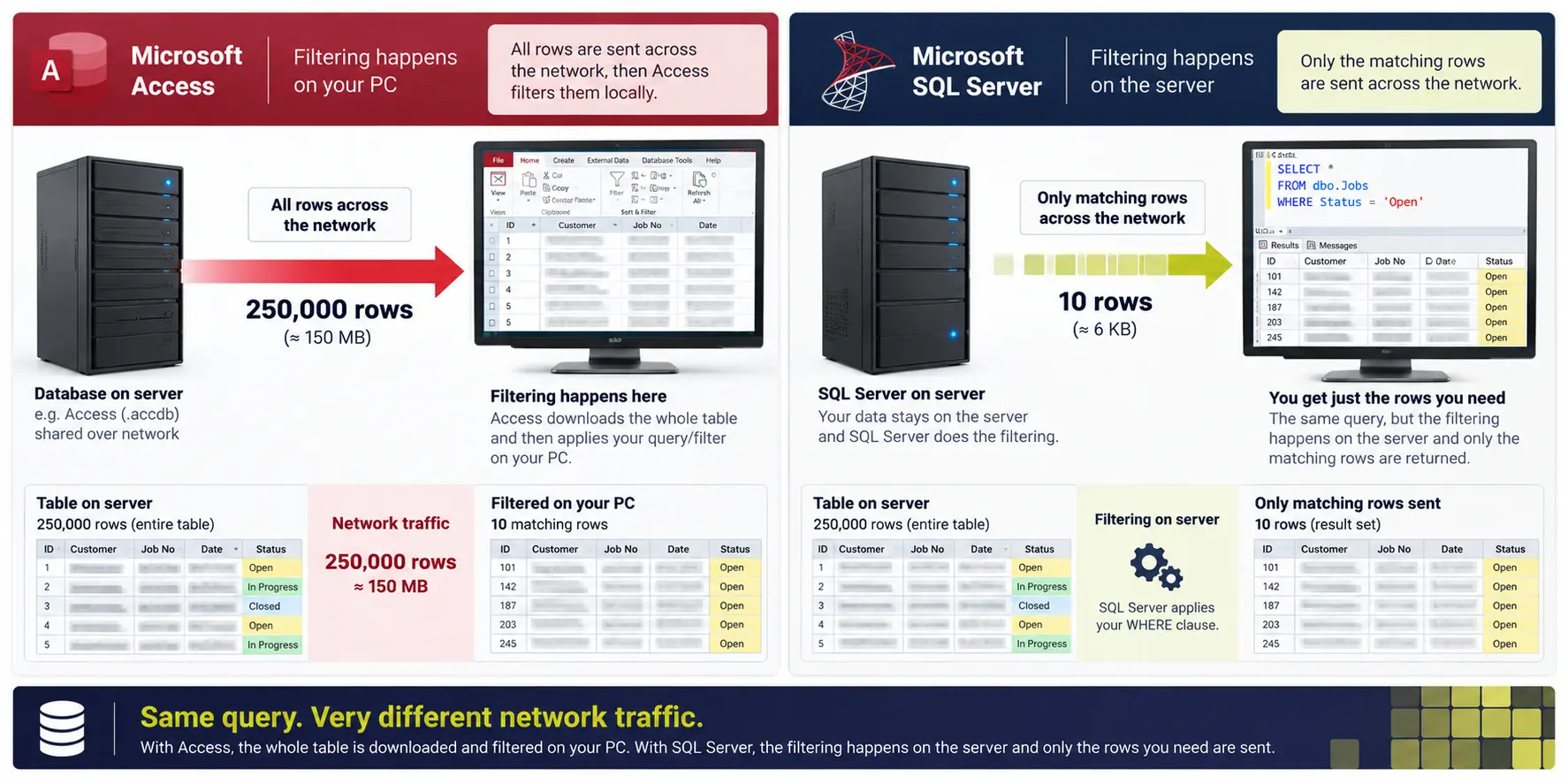
The one that explains everything else
Here’s the difference that causes most of the symptoms.
When Access needs ten records out of a hundred thousand, it pulls the table — or at least the index — across the network and works out which ten at your end.
When SQL Server is asked the same question, it works out the answer at the server and sends ten records.
On a small file, nobody notices. As the data grows, one of those scales and the other doesn’t — and that’s why an Access system that was fine for years becomes unusable without anything obvious having changed.
It’s also why “the network is slow” and “the database is slow” are so often the same complaint.
You may not need to buy anything
The assumption that SQL Server means a server and a licence puts people off unnecessarily.
SQL Server Express is free. It has limits — 10GB per database and a cap on memory and CPU — but 10GB is five times what Access allows, and for a great many business systems it’s plenty. Plenty of our clients run on it permanently.
Azure SQL means no server at all. You pay monthly for the database rather than buying hardware, and Microsoft handles the patching and backups. For a small system the monthly cost is often less than people expect → Azure SQL and cloud
And there’s no dedicated administrator required at this size. That was true when the alternative was a big on-premises deployment. A small SQL Server or Azure SQL database doesn’t need somebody watching it — it needs somebody to ring when something’s wrong → SQL Server support
You don’t have to give up Access
The part most people miss.
Moving to SQL Server doesn’t mean replacing your Access application. The most common thing we do is keep the Access front end exactly as it is and move only the data to SQL Server or Azure SQL behind it.
Users open the same forms they opened yesterday. What goes away is the concurrency, the corruption, the 2GB ceiling and the network problem — because those were never really Access problems, they were file-sharing problems.
It’s usually the cheapest significant improvement available, and it’s reversible if it doesn’t suit.
So which is it?
Stay on Access if it’s one site, under about fifteen people, comfortably inside 2GB, and the problem is something specific that can be fixed → Access performance tuning
Move the data to SQL Server, keep Access in front if you’re hitting the user limit, the size limit or corruption — which is most people who ask this question.
Go further if you need remote or web access, tighter security, serious reporting, or processes running round the clock.
Not sure which? A health check will tell you where the actual problem is, before you spend anything → Access health check
Case Studies
 Commercial Catering Service & Maintenance (field service)
Aire Valley Catering
Field service apps that work with no signal
Aire Valley Catering’s engineers work in commercial kitchens across the UK, often with no usable signal, and every job still has to be recorded. We built four production…
View case study
Commercial Catering Service & Maintenance (field service)
Aire Valley Catering
Field service apps that work with no signal
Aire Valley Catering’s engineers work in commercial kitchens across the UK, often with no usable signal, and every job still has to be recorded. We built four production…
View case study
 Transport and logistics
ACC Worldwide
A faster SQL Server system, noticed on day one
ACC Worldwide’s staff used one business system all day, every day, and it was slow. We worked on the SQL Server environment behind it. The speed-up was immediate,…
View case study
Transport and logistics
ACC Worldwide
A faster SQL Server system, noticed on day one
ACC Worldwide’s staff used one business system all day, every day, and it was slow. We worked on the SQL Server environment behind it. The speed-up was immediate,…
View case study
 Travel and leisure (adventure travel and expeditions)
Jagged Globe
Keeping bookings, customer records and the website in step
Jagged Globe runs on an internal database and a booking website that have to agree every day, and sometimes they didn’t. We traced and fixed the transfers between…
View case study
Travel and leisure (adventure travel and expeditions)
Jagged Globe
Keeping bookings, customer records and the website in step
Jagged Globe runs on an internal database and a booking website that have to agree every day, and sometimes they didn’t. We traced and fixed the transfers between…
View case study
Do you actually need to move?
Tell us what’s wrong — how many users, how big the database is, and what’s slow. We’ll tell you whether SQL Server is the answer or whether there’s a cheaper one.