

The database won’t open. Records have disappeared, or the backup you were counting on won’t restore. Whatever the system is built in, the business has stopped with it.
This can often be put right. CDE Systems has worked on Access, SQL Server, MySQL and bespoke databases since 1999, including getting them back when they fail. We always work on copies, never on your only original. You’ll hear early what is coming back and what isn’t.
Before anything else, stop people using it and take a copy. Then ring.
Before you do anything else
- Stop using it. Every further change to a damaged database makes recovery harder, and can overwrite records that are still intact.
- Take a copy, and leave that copy alone. Take a backup if you can. If not, copy the files somewhere safe while the system is stopped. It’s the most useful thing you can do in the next five minutes.
- Don’t run a repair tool on your only copy. Built-in repairs work often enough to be worth trying. When they fail they can leave things worse, and some say so in their name, as in “allow data loss”.
- Don’t detach a SQL Server database that shows as suspect. It often can’t be reattached, and that can turn a recoverable problem into a permanent one.
Then ring and tell us what the error says.
What we recover
Corruption. After an unexpected shutdown, a network drop, a storage failure or a software fault. We find the cause, recover what’s there and restore integrity where it can be restored.
Deleted, overwritten or missing data. Including the update that was run without a WHERE clause. It happens more often than anyone admits.
Failed restores and broken backup chains. Often the real emergency. The database failed, and then the backup turned out not to work.
Older and inherited systems. Where understanding how it was built is most of the job before recovery can start.
Systems that look broken but aren’t. Sometimes it’s performance, growth or a design limit, not damage. That’s much better news, and worth knowing before anyone starts a recovery.
By technology
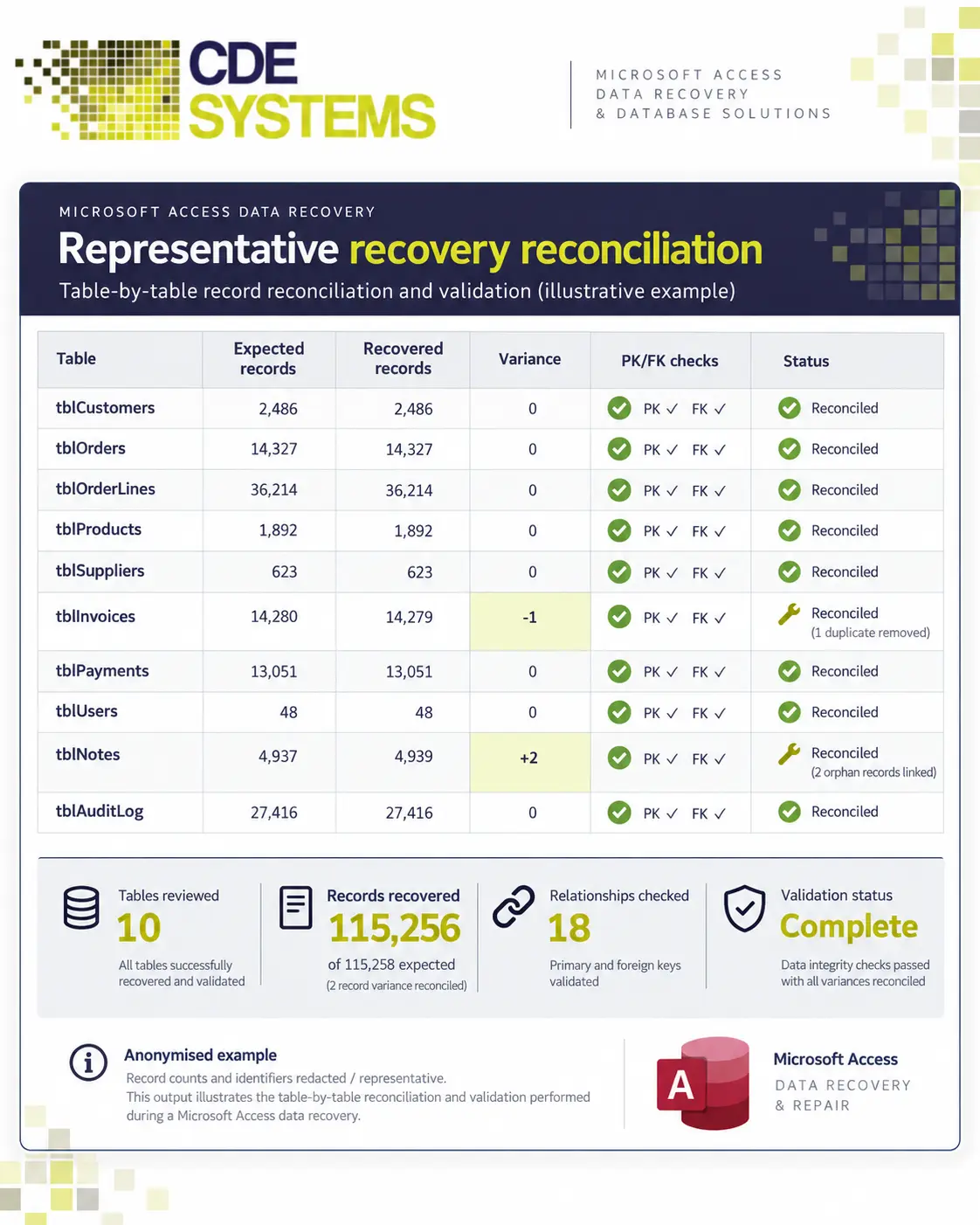
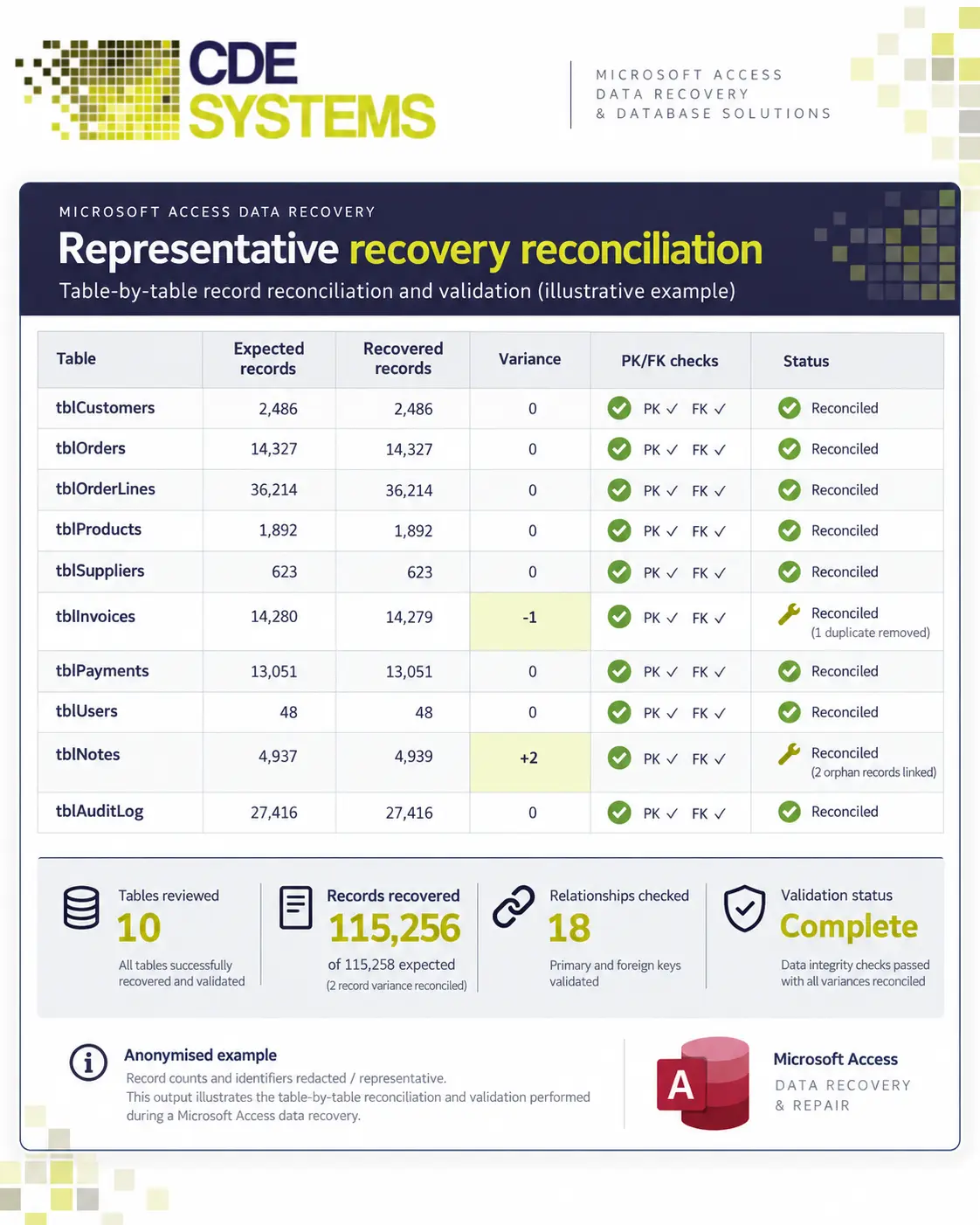
Microsoft Access. Corrupt ACCDB and MDB files, broken links between the interface and the data file, network-related corruption, and damaged forms, reports and queries. Where a file can’t be repaired outright, we recover what we can into a clean database your existing interface will open. Access repair and recovery
SQL Server. Suspect and recovery-pending databases, consistency errors, page corruption, failed restores, transaction log problems and damaged system databases. With a good backup, restoring beats repairing every time, so that’s what we check first. SQL Server repair and recovery
MySQL. Corruption, crashed tables and failed restores, often on systems behind a website. MySQL
Bespoke and inherited systems. Where the database sits behind software that has grown over years, the developer has gone and there’s no documentation. Working out how it fits together is part of the recovery. Legacy software rescue
Database recovery and data rescue, CDE Systems Sheffield
How we work
We work on copies. The files you send us are never the ones we operate on.
First we find out what is damaged. It’s usually much less than it looks. Then we work through the routes in the order that keeps the most data. That means a restore from backup if there is one, then repair in place, then extracting the database object by object. Where the structure itself has gone, we read the data out and rebuild around it.
You’ll get a straight account of what was recovered and anything that wasn’t. If something isn’t coming back, you’ll hear early. Most jobs are dealt with over remote support, often the same day.
☎ 0114 249 1036
Is this a job for a recovery lab?
Sometimes, and it’s worth knowing which before you ring anyone.
If the hardware is physically dead, with a drive that won’t spin up, fire or water damage or a snapped SSD, you need a specialist lab with a clean room. Ring one of those first. Once they’ve got the files back, we can rebuild the database around them.
If the storage is readable but the database isn’t usable, that’s us. Corrupt files, damaged structures, broken systems and failed restores.
Not sure which you have? Ring and describe it. It’s a two-minute conversation, and it saves calling the wrong people.
Ransomware
It’s a different problem from corruption. The database is usually intact but encrypted, so the question is the cleanest route back, and from what date.
We work with you and your IT people on what can be recovered and how far back you can realistically go. Then we work out what happened between then and now that needs reconstructing, and get a working system running somewhere clean.
The hard part is rarely technical. It’s usually that the backups were on a share the ransomware could also reach, which is why keeping backups separate is the thing we push hardest on afterwards.
After the crisis
Once you’re running again, we can make the system stable and write down how it works. We can set up backups that would survive this happening again, deal with whatever contributed to the failure, and put monitoring in place so the next problem is noticed early. Database support
If you’re planning ahead
Not everyone reading this has lost a database. Some people are checking whether they’d survive losing one, and that’s a much cheaper conversation to have.
We restore your backups to see if they work. We work out how long recovery would take, how much data you’d lose, and whether the backups are somewhere ransomware can reach. Most businesses have never been given those numbers for their own system. Database health check
Where we’ve done it
A software provider found several of its customers’ SQL Server databases damaged and refusing to open. We assessed each one, recovered the audit and customer records, rebuilt structures that were past repair, and got those systems back into service. The provider kept serving its customers throughout.
 Commercial Catering Service & Maintenance (field service)
Aire Valley Catering
Field service apps that work with no signal
Aire Valley Catering’s engineers work in commercial kitchens across the UK, often with no usable signal, and every job still has to be recorded. We built four production…
View case study
Commercial Catering Service & Maintenance (field service)
Aire Valley Catering
Field service apps that work with no signal
Aire Valley Catering’s engineers work in commercial kitchens across the UK, often with no usable signal, and every job still has to be recorded. We built four production…
View case study
 Transport and logistics
ACC Worldwide
A faster SQL Server system, noticed on day one
ACC Worldwide’s staff used one business system all day, every day, and it was slow. We worked on the SQL Server environment behind it. The speed-up was immediate,…
View case study
Transport and logistics
ACC Worldwide
A faster SQL Server system, noticed on day one
ACC Worldwide’s staff used one business system all day, every day, and it was slow. We worked on the SQL Server environment behind it. The speed-up was immediate,…
View case study
 Travel and leisure (adventure travel and expeditions)
Jagged Globe
Keeping bookings, customer records and the website in step
Jagged Globe runs on an internal database and a booking website that have to agree every day, and sometimes they didn’t. We traced and fixed the transfers between…
View case study
Travel and leisure (adventure travel and expeditions)
Jagged Globe
Keeping bookings, customer records and the website in step
Jagged Globe runs on an internal database and a booking website that have to agree every day, and sometimes they didn’t. We traced and fixed the transfers between…
View case study
Tell us what’s happened
Stop people using the system, take a copy of whatever you can, and ring. Tell us what it is, what the error says and what happened just before. If there’s a good backup, this may be simpler than it looks.