
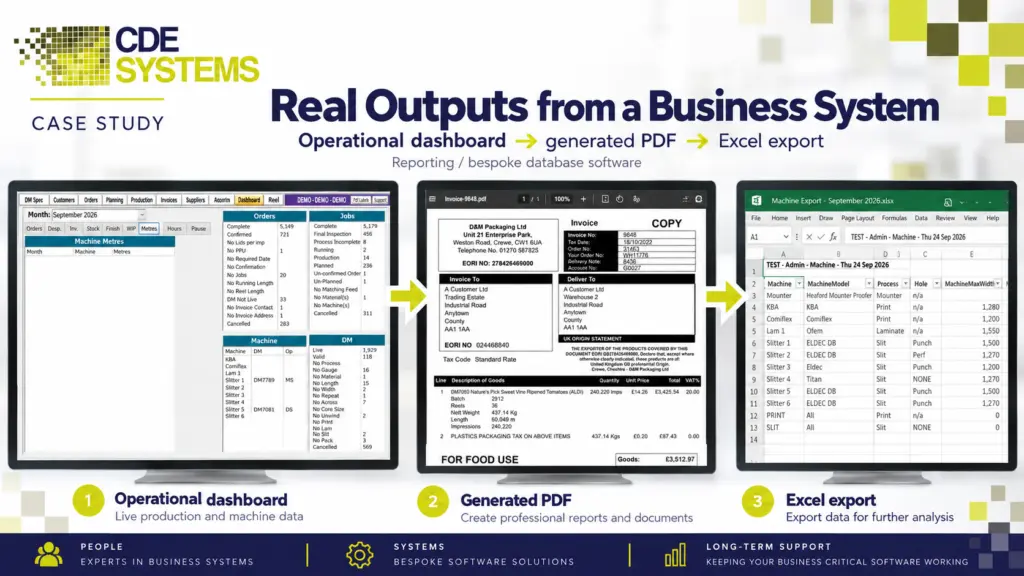
Your system knows which customers pay late and which jobs lose money. It knows which stock has sat on the shelf for two years. Getting any of that out means someone runs a query, exports it to Excel and reformats it, every week, by hand.
By the time you have it, it’s out of date. Or maybe two people asking the same question get two different answers.
You don’t need a business intelligence programme to fix that. CDE Systems builds the reports and dashboards straight from the system you have, in whichever tool suits you. We start with the one someone currently builds by hand, and you decide which numbers matter.
Where the time goes
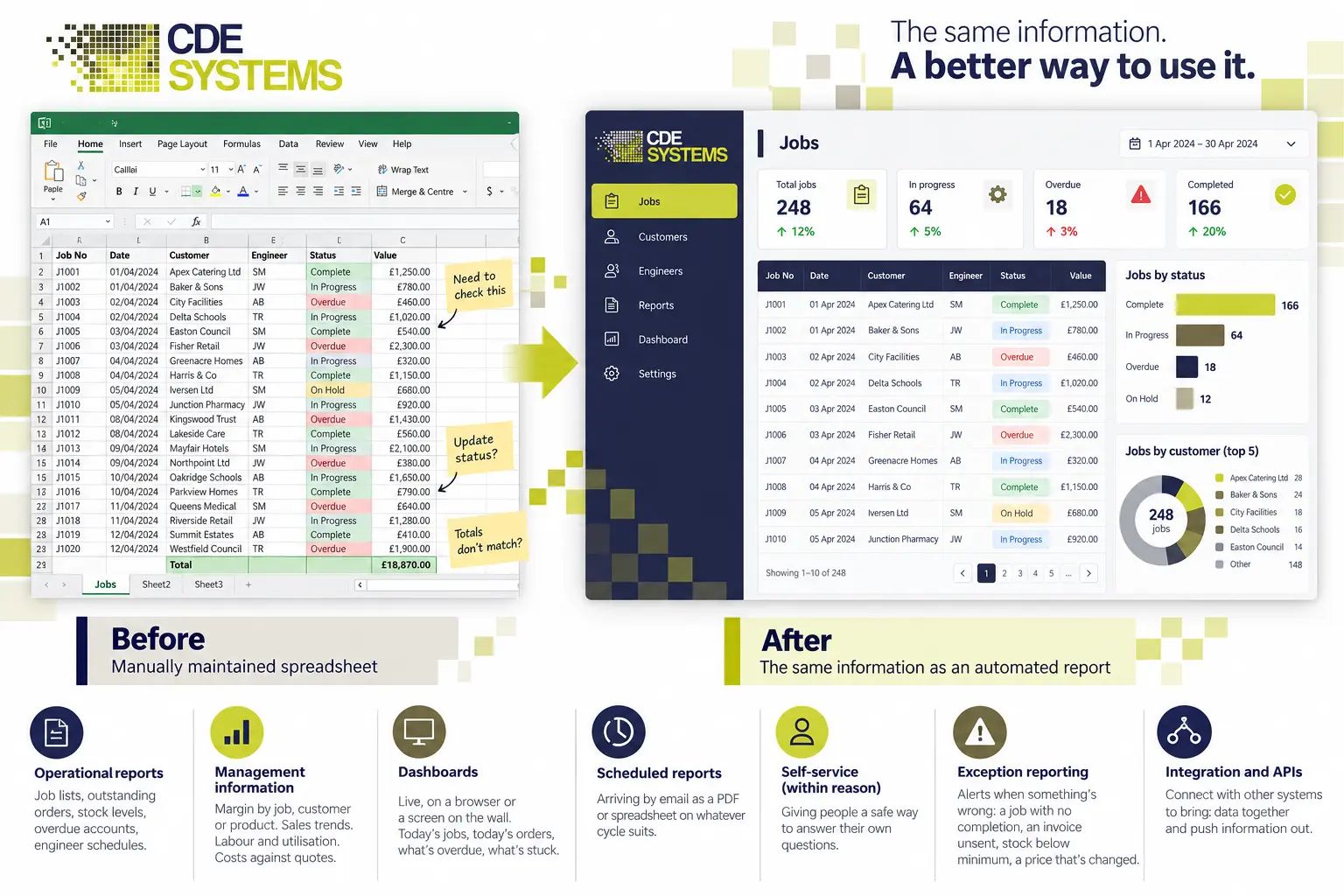
- The reports are really exports. Someone pastes a query into Excel, adds the totals and the formatting, and emails it round. It takes half a day, every week.
- The figures don’t agree. Two reports answer the same question differently, so neither one gets believed.
- The reports are old. They were written years ago by someone who has gone, in a tool no one can open, against a structure that has changed twice since.
- You see last month, not today. Month-end works. Knowing what’s happening right now takes a phone call.
- The real questions need SQL. So people stop asking them.
What it costs
Nobody enjoys rebuilding the same spreadsheet every Monday, and the hours add up. The bigger cost is quieter. Decisions get made on last month’s figures, or on a hunch, because today’s figures take too long to get. Meetings spend twenty minutes on whose number is right.
What we build
Day-to-day reports. Job lists, outstanding orders, stock levels, overdue accounts and engineer schedules. They’re quick and accurate, and people can run them without asking anyone.
Management information. Margin by job, customer or product, sales trends, labour and utilisation, and costs against quotes. They’re produced the same way every month, so one month can be compared with the next.
Dashboards. In a browser or on a screen on the office wall, showing today’s jobs and orders and what’s overdue or stuck. A good one changes what people do by 10am, not what they discuss at month-end.
Scheduled reports. A PDF or spreadsheet that arrives by email on whatever cycle suits, for the many people who’d rather it turned up than go looking.
Answers people can find themselves. A safe way for staff to answer their own questions, so “can you pull me a list of…” stops being a two-day wait.
Exception alerts. Often the most useful of all. It isn’t a report anyone reads. It’s a message when something is wrong, such as a job never completed, an invoice not sent, stock below its minimum or a price that has changed. Database integration and APIs
Which tool
Power BI, where it fits, which is often, especially on Microsoft 365. It’s licensed per user per month, so for a thirty-person business that’s an ongoing cost to weigh up at the start.
SQL Server Reporting Services, where it’s already in place and working. It’s unfashionable, and it’s fine.
Reports inside your own system, so people run them where they already work. For a lot of businesses this is the right answer, and it rarely gets offered.
Excel, where Excel is right, with a live connection to the data that refreshes when the file opens. Finance teams live in Excel, and there’s no point fighting it. The trouble was never Excel. It was the copying and pasting.
Reports nobody can maintain any more
This one is common. The reporting works, but it was built in Crystal Reports, an old version of Access or a tool the supplier no longer sells, and the person who understood it has left.
We take those on. We work out what each report does, write it down and keep it running while you decide. Then we rebuild the ones worth rebuilding, a few at a time, starting with the ones people use most.
Reports are only as good as the data
If a customer is in the system three times under slightly different names, no tool will give you a correct customer count.
Reporting work tends to turn up data problems early. There are duplicates and blanks, free text where a list should have been, and a field someone started using for something else years ago. It’s better to find those first and fix them than to build a good-looking dashboard on top.
You probably don’t need a data warehouse
With one main system and a few things around it, you don’t need a warehouse, an ETL platform or a BI strategy. You need the data arranged sensibly, a handful of well-written queries and somewhere to look at the results.
If the business has several systems that need bringing together, we’ll build the layer that does it, and say when you’ve reached that point. It’s usually further off than people are told.
Part of the job is knowing what to leave out. A dashboard with forty numbers gets looked at twice. One with the four that matter gets looked at every morning.
Reporting we’ve built
The ongoing support and willingness to adapt the system to our changing requirements has helped us improve reporting, budgeting and financial visibility across the business.
Budgen Motors
Case Studies
 Manufacturing & Engineering (precision fasteners and components)
Bolt & Nut Manufacturing
Certificates and stock you can trace from goods-in to the job
Bolt & Nut Manufacturing had grown, and its system had grown with it, but too much still depended on people remembering things. We extended the system it already…
View case study
Engineering & Manufacturing
Bolt & Nut Manufacturing
Live jobs and reports that don’t need chasing
On Bolt & Nut Manufacturing’s factory floor, live jobs were only visible to whoever booked them in, and some production details were entered late or not at all.…
View case study
Manufacturing & Engineering (precision fasteners and components)
Bolt & Nut Manufacturing
Certificates and stock you can trace from goods-in to the job
Bolt & Nut Manufacturing had grown, and its system had grown with it, but too much still depended on people remembering things. We extended the system it already…
View case study
Engineering & Manufacturing
Bolt & Nut Manufacturing
Live jobs and reports that don’t need chasing
On Bolt & Nut Manufacturing’s factory floor, live jobs were only visible to whoever booked them in, and some production details were entered late or not at all.…
View case study
 Commercial catering service and maintenance
Aire Valley Catering
Years of support behind a field service operation
We’ve supported and developed Aire Valley Catering’s systems for many years, through growth, new apps and changing customer expectations. The systems have improved steadily throughout, and the business…
View case study
Commercial catering service and maintenance
Aire Valley Catering
Years of support behind a field service operation
We’ve supported and developed Aire Valley Catering’s systems for many years, through growth, new apps and changing customer expectations. The systems have improved steadily throughout, and the business…
View case study
Which report does someone build by hand?
Tell us what gets exported to Excel every week and what happens to it next. That’s nearly always the first thing worth automating. We’ll come back with what it would take and what it would cost.