

“Move to the cloud” tends to arrive as one big decision. It’s really a series of smaller ones. Each has its own cost, its own disruption and its own right answer, depending on what you run and who needs to reach it.
Taken one at a time, they’re manageable. You know what each move will cost a month before you agree to it, and the parts that are fine where they are can stay there.
CDE Systems works through that with you, from Sheffield, for businesses across the UK. We build what moves so that you own its definition, and we’ll say when staying put is the cheaper answer. You stay in charge of the estate.
What’s pushing the question?
It’s rarely the cloud for its own sake. More often a server is due for replacement, or staff need the system from home and the VPN can’t cope. Sometimes a supplier has proposed Azure as part of a bigger quote, or an auditor has started asking about MFA and backups.
Each of those has a different answer. Some point to Azure, and some point to a better-specified server in the office. Working out which is the first job.
What we look after in Azure
Databases. SQL Server, Azure SQL, Managed Instance and MySQL. It’s the part we’ve done longest, and the part most businesses move first. Azure SQL and SQL Server in the cloud
Applications. Web applications, APIs, portals and background jobs on App Service or Container Apps. They scale up when you need it and cost very little when you don’t.
Containers. Container Apps for most things, Container Instances for scheduled and one-off work, and AKS where the estate really needs it. Most don’t, and we’ll say so.
Integration. APIs, queues, webhooks, scheduled exchanges, and the file drops plenty of business software still depends on. Database integration and APIs
The infrastructure underneath. Networking, private endpoints, storage, certificates, DNS, backup and disaster recovery. It’s the unglamorous half, and it decides whether everything else stays up.
Identity. Microsoft Entra ID, hybrid directory sync, MFA, conditional access, managed identities and privileged access.
Microsoft 365, where your business systems need to work with Exchange, SharePoint or Teams instead of sitting beside them.
One workload at a time
A hybrid setup is a sensible place to end up, not a project left half done. Many businesses have an office server that works perfectly well and one workload that benefits from Azure. It might need remote access, resilience or a public-facing application. Moving that one thing, and leaving the rest, can be the right answer for years.
So we work in stages. We start with what hurts most and get it running and paying its way before the next step. No weekend cutover where the business bets everything on Monday morning.
SQL Server migration and upgrades · Modernise existing systems
What it costs each month
The build is a one-off. The monthly bill isn’t, and it’s where cloud projects most often go wrong. So you get a monthly figure before you commit, worked out from these.
- Licences you already own. Azure Hybrid Benefit puts existing SQL Server and Windows Server licences with Software Assurance against the Azure bill. It’s missed surprisingly often.
- Reserved capacity. A one or three year commitment brings the price down a long way.
- Sizing from measurement. Many first Azure quotes are oversized, because guessing big is easier than measuring.
- The items nobody budgets for. Data leaving Azure, storage tiers, backup retention and log volumes.
- Things that switch off. Development and test environments don’t need to run at 2am.
- A look back later. Estates gather things over time, and we’ll point out what you’re paying for that sits unused.
Built so you own it
Many small and mid-sized Azure estates were set up by someone clicking through the portal. That’s fine until they leave, or you need a test environment that matches the live one. It’s also fine until something changes and no one can say what it used to be.
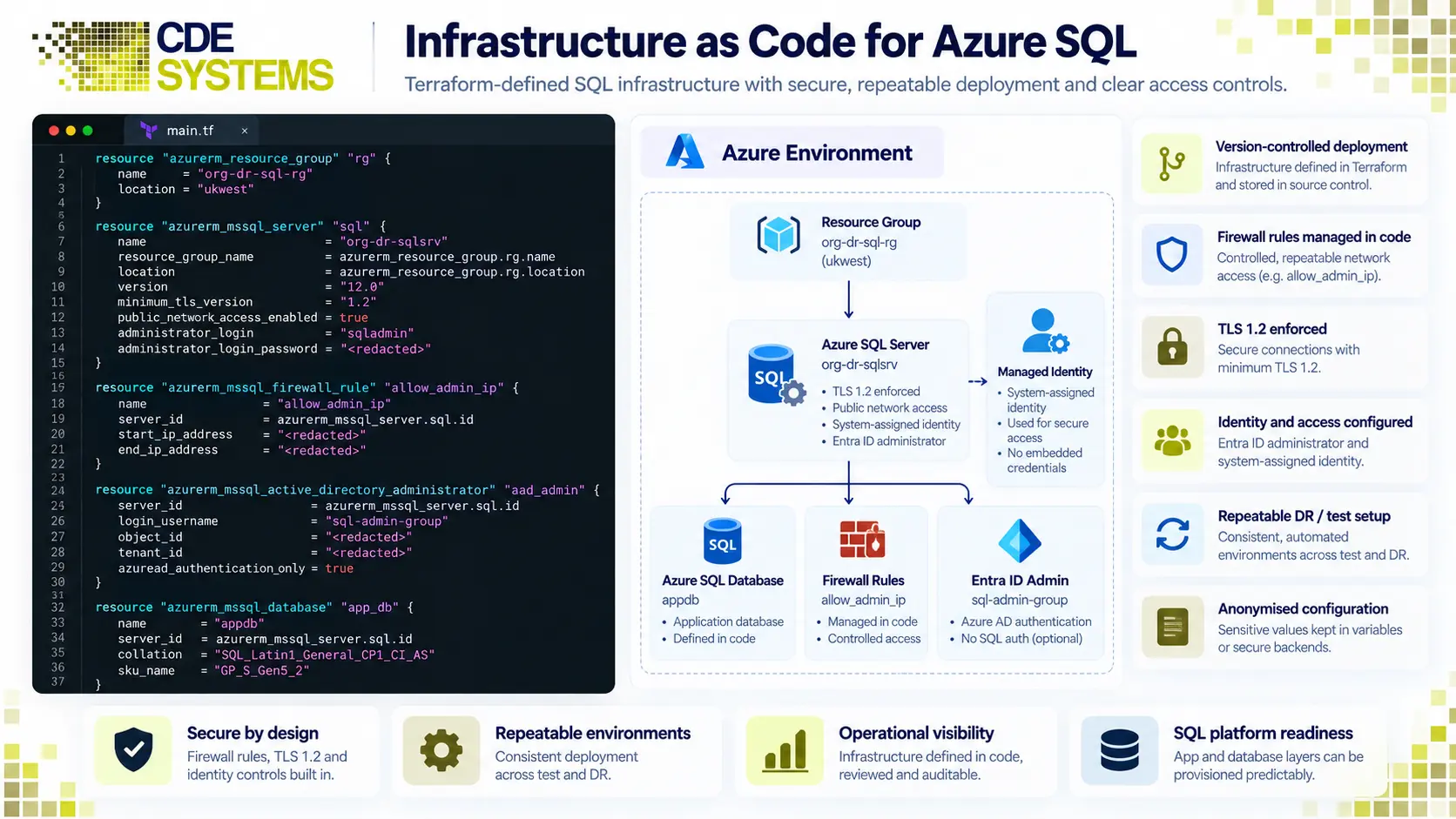
We define the infrastructure in Terraform. That covers databases, networks, private endpoints, Key Vault, app services and permissions. Development, test and live come from one definition, so they match. Every change is reviewed and recorded, with who made it and why. Anything that has drifted shows up as a difference, not as a surprise mid-incident.
It also means the whole environment can be rebuilt from the code, which is a disaster recovery position most businesses this size don’t have. You own the definition. If you take the work in-house or to someone else, the environment goes with you.
If your team works in Bicep or ARM templates and would rather stay that way, we’ll work in those.
Identity decides who gets in
Firewall rules matter, but Entra ID is what decides who reaches your data, and it’s where most estates are weakest.
That means directory sync that’s monitored, and access granted by group, including on the databases. Applications use managed identities, so there’s no password in a connection string. Admin accounts get MFA and just-in-time rights, and leavers lose access straight away, including any session they’re still holding. Then there are the forgotten accounts, such as the service account with no owner, or the shared login kept in a spreadsheet.
This is also what auditors look at first. Cyber Essentials, ISO 27001, the DSPT and client security questionnaires all start with access control and MFA. We build to answer them and can help with the submissions.
How this works on the database itself Azure SQL and Entra ID
Not only Azure
Most of the businesses we work with run on Microsoft, with SQL Server, Microsoft 365, Windows and Entra ID. For them Azure is usually right, because the licensing, identity and support line up.
It isn’t always the right tool, though. AWS makes sense where a client already has an estate there, or a particular service fits better. DigitalOcean or similar can suit a modest web application with steady traffic that doesn’t need enterprise pricing. And your own servers may be cheapest, if the hardware has life left in it and remote access isn’t needed.
Because the infrastructure is written in Terraform, the same care and review apply wherever it runs. What we won’t do is move you somewhere because it’s what we happen to like.
When the cloud isn’t the answer
Sometimes the system is stable, no one is asking for changes, and the server has years left in it. If there’s no need for remote access and no compliance pressure, staying where you are is often simpler and cheaper.
The cloud earns its place for specific reasons. Those are reaching systems from outside the office, resilience you couldn’t otherwise justify, demand you can’t predict, and getting out of the hardware replacement cycle. Either they apply to you or they don’t.
Not sure yet? An assessment is a better start than a project. SQL Server health check
Case Studies
 Commercial Catering Service & Maintenance (field service)
Aire Valley Catering
Field service apps that work with no signal
Aire Valley Catering’s engineers work in commercial kitchens across the UK, often with no usable signal, and every job still has to be recorded. We built four production…
View case study
Commercial Catering Service & Maintenance (field service)
Aire Valley Catering
Field service apps that work with no signal
Aire Valley Catering’s engineers work in commercial kitchens across the UK, often with no usable signal, and every job still has to be recorded. We built four production…
View case study
 Transport and logistics
ACC Worldwide
A faster SQL Server system, noticed on day one
ACC Worldwide’s staff used one business system all day, every day, and it was slow. We worked on the SQL Server environment behind it. The speed-up was immediate,…
View case study
Transport and logistics
ACC Worldwide
A faster SQL Server system, noticed on day one
ACC Worldwide’s staff used one business system all day, every day, and it was slow. We worked on the SQL Server environment behind it. The speed-up was immediate,…
View case study
 Travel and leisure (adventure travel and expeditions)
Jagged Globe
Keeping bookings, customer records and the website in step
Jagged Globe runs on an internal database and a booking website that have to agree every day, and sometimes they didn’t. We traced and fixed the transfers between…
View case study
Travel and leisure (adventure travel and expeditions)
Jagged Globe
Keeping bookings, customer records and the website in step
Jagged Globe runs on an internal database and a booking website that have to agree every day, and sometimes they didn’t. We traced and fixed the transfers between…
View case study
Tell us what you’re running
What’s on your servers, who needs to reach it from where, and what’s prompting the question. We’ll come back with what belongs in the cloud, what doesn’t, and what it would cost a month, before you commit to anything.