

SQL Server 2016 reached the end of extended support on 14 July 2026. If a database the business relies on still runs on it, that database no longer gets security updates, and SQL Server 2017 follows in October 2027.
Plenty of businesses are on 2016 or older, and nothing has gone wrong, which is exactly why the upgrade keeps slipping down the list. It usually comes to a head when someone outside the business asks about it. That might be an auditor, an insurer, or a client with a security questionnaire.
CDE Systems has worked on SQL Server since 1999, and upgrades and migrations are a large part of that. We map everything that depends on the server, rehearse the move on a copy, and cut over on a date you agree. The old system stays intact until someone on your side has signed off the numbers. And if it doesn’t need doing yet, or there’s a cheaper way to buy time, we’ll say that first.
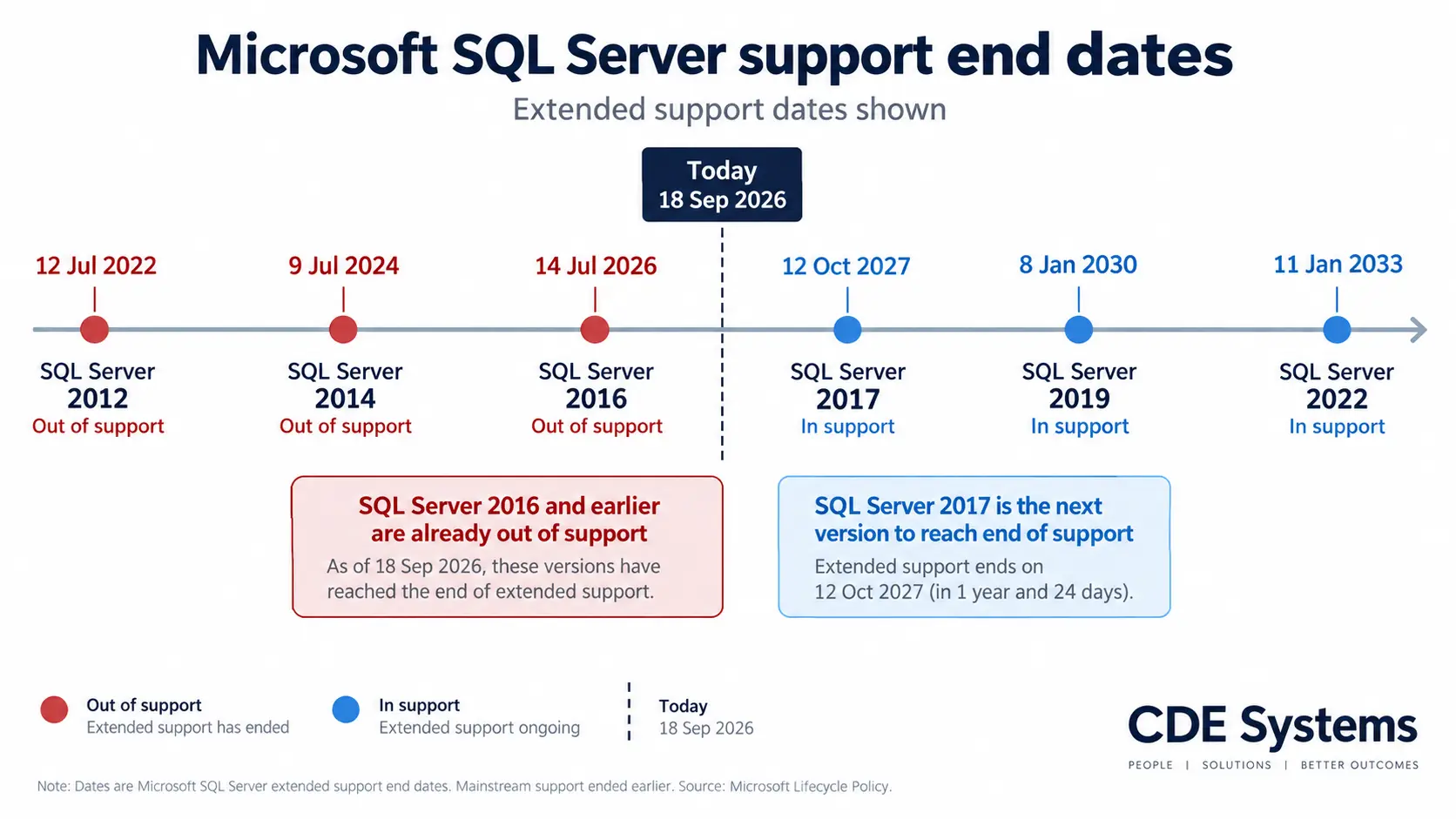
Where your version stands
| Version | Extended support |
| SQL Server 2012 | Ended 12 July 2022 |
| SQL Server 2014 | Ended 9 July 2024 |
| SQL Server 2016 | Ended 14 July 2026 |
| SQL Server 2017 | Ends 12 October 2027 |
| SQL Server 2019 | Ends 8 January 2030 |
No security updates is a technical problem, but it tends to arrive as a paperwork one. Cyber Essentials, ISO 27001, cyber insurance and client security questionnaires all ask about unsupported software, and an out-of-support database server is the answer that fails.
There are ways to buy time short of upgrading straight away. Extended Security Updates are one. Moving to Azure is another, because there the extended updates come at no extra cost. We’ll tell you which applies and what each would cost.
Don’t know which version you’re running? That’s a two-minute phone call.
Four jobs that all get called migration
| The job | When it’s the one | Where the work really is |
| Version upgrade | 2012, 2014 or 2016 onto a current version | The application on top, deprecated syntax, compatibility levels, and the reports that haven’t been run since 2019 |
| Server move | New hardware, a new host, a datacentre change, or a server out of warranty | A good moment to fix storage and memory settings that were chosen years ago and never revisited |
| Consolidation | Several instances, often on several servers, often licensed separately | Bringing them together can cut licensing costs substantially, and makes monitoring and backup easier to get right |
| Cloud | Azure SQL Database, Azure SQL Managed Instance, or SQL Server on an Azure VM | Three different answers, with different costs and different amounts of change. See Azure SQL and cloud |
Most real projects are two or three of these at once.
What it’s like afterwards
On the Monday, people open the same application they used on Friday and carry on. The difference is underneath. The server is on a supported version, the next audit question has a straightforward answer, and the configuration has been looked at by someone who meant to look at it.
Your team has the assessment, the rollback plan and the reconciliation figures on file, which is useful the next time somebody asks how the upgrade was handled.
How we keep the move uneventful
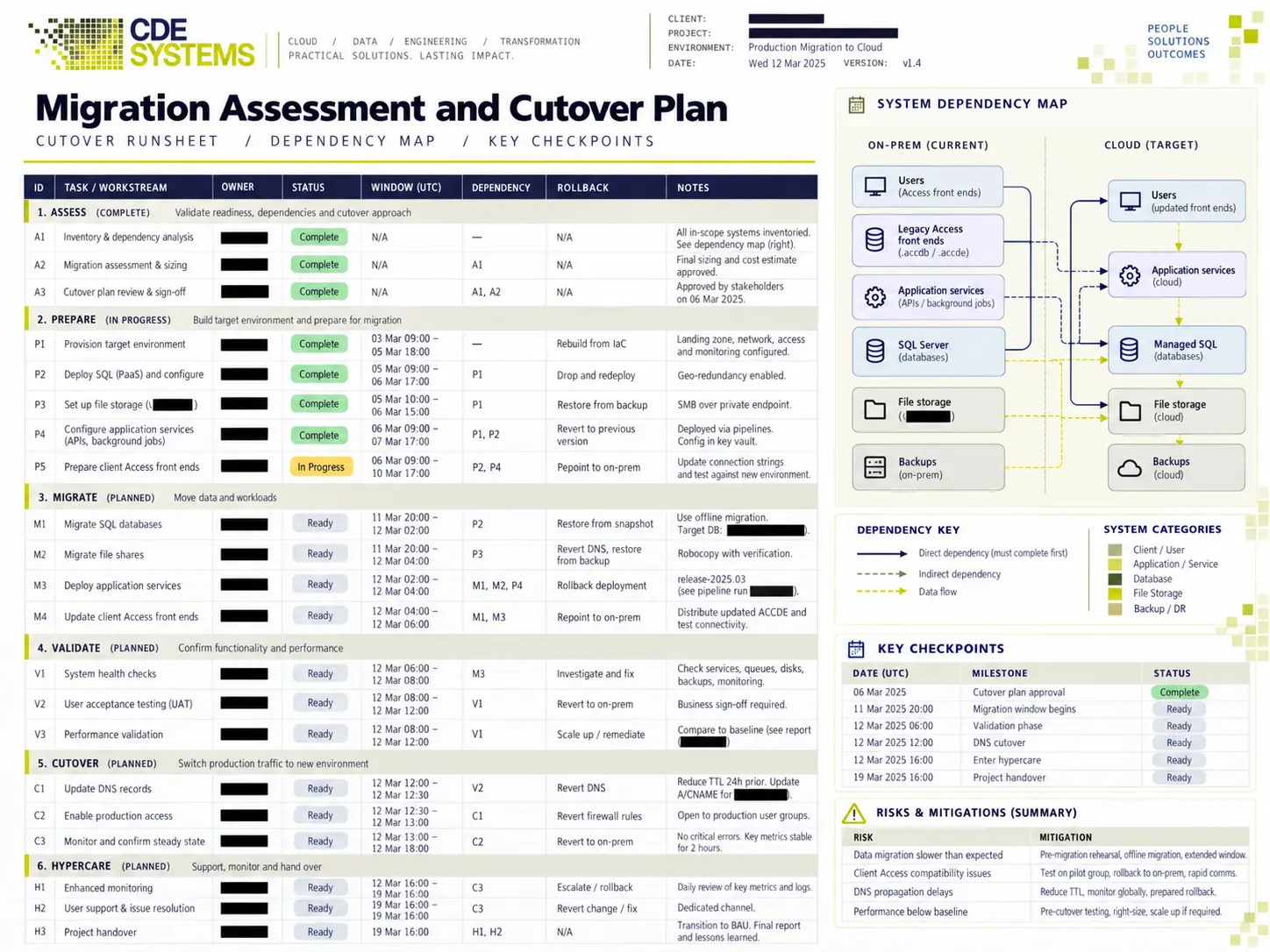
Upgrades are one of the riskiest bits of maintenance a system goes through. Planned badly, they bring in bugs, change performance and take things down unexpectedly. So most of the work is making sure nothing happens on the night that you didn’t expect.
- Assessment first. We list what’s on the server, what depends on it and what talks to it. That means agent jobs, linked servers, SSIS packages and reports, plus any applications people had forgotten were pointed at it.
- A rehearsal on a copy. We do the migration at least once before the real night, and time it, so the outage window we give you is one we’ve measured.
- Performance checked before and after. A newer version can change execution plans. We capture a baseline before and compare after, so any change shows up in testing and not on Monday morning.
- Cutover agreed in advance, with a time fixed for calling it off if it isn’t going well.
- A written rollback plan, with the old system kept intact until you’re satisfied.
- Counts and totals reconciled afterwards, and signed off by someone on your side who knows what the numbers should say.
- We’re still around the week after. SQL Server support and consultancy
If you have an IT team, they stay in charge of the servers and the change process, and we do the database work alongside them.
Moving into SQL Server
A good share of migrations go the other way.
- From Microsoft Access, keeping the Access interface and moving the data. See Access migration and upgrades
- From MySQL, where a system has outgrown it or the business has standardised on Microsoft. See MySQL
- From spreadsheets, where an important process is living in a shared workbook
- From a system no one supports any more, where the data matters and the application doesn’t. See legacy software rescue
Do we need to move at all?
Sometimes not yet. If the version is supported and the system is slow, the cheaper fix is usually the queries and indexes. See SQL Server performance tuning.
If you’re not sure whether you need an upgrade, some tuning or nothing at all, start with an assessment. A SQL Server health check costs £495(+VAT) and tells you in writing.
Platform work we’ve done
 Commercial Catering Service & Maintenance (field service)
Aire Valley Catering
Field service apps that work with no signal
Aire Valley Catering’s engineers work in commercial kitchens across the UK, often with no usable signal, and every job still has to be recorded. We built four production…
View case study
Commercial Catering Service & Maintenance (field service)
Aire Valley Catering
Field service apps that work with no signal
Aire Valley Catering’s engineers work in commercial kitchens across the UK, often with no usable signal, and every job still has to be recorded. We built four production…
View case study
 Transport and logistics
ACC Worldwide
A faster SQL Server system, noticed on day one
ACC Worldwide’s staff used one business system all day, every day, and it was slow. We worked on the SQL Server environment behind it. The speed-up was immediate,…
View case study
Transport and logistics
ACC Worldwide
A faster SQL Server system, noticed on day one
ACC Worldwide’s staff used one business system all day, every day, and it was slow. We worked on the SQL Server environment behind it. The speed-up was immediate,…
View case study
 Travel and leisure (adventure travel and expeditions)
Jagged Globe
Keeping bookings, customer records and the website in step
Jagged Globe runs on an internal database and a booking website that have to agree every day, and sometimes they didn’t. We traced and fixed the transfers between…
View case study
Travel and leisure (adventure travel and expeditions)
Jagged Globe
Keeping bookings, customer records and the website in step
Jagged Globe runs on an internal database and a booking website that have to agree every day, and sometimes they didn’t. We traced and fixed the transfers between…
View case study
Which version are you on?
Tell us the SQL Server version, what sits on top of it, and when you could take an outage. We’ll come back with what the upgrade involves, what it would cost, and whether it needs doing yet.