

The database is slow, and everyone has got used to it. There’s the form that takes a minute to open, and the search you start before going to put the kettle on.
Once people stop relying on the database they start keeping their own spreadsheets on the side, and it isn’t long before there are two sets of figures and no agreement about which to believe. That’s usually when someone suggests buying a new system.
Most of the time you don’t need one. CDE Systems has specialised in Access since 1999, and most of the slow databases we’re asked to look at can be fixed in days, without moving them anywhere. That’s what Access performance tuning is. You tell us which bits are slow, and we find out why.

How it tends to show up
- It’s quick with one person in and painful with five
- It’s slow first thing and fine by mid-morning
- It gets a bit slower every year as the data grows
- There’s one form, or one report, that everybody avoids
- Someone has suggested a new system as the cure
Slow Access databases are common, and it’s rarely anyone’s fault. Access’s default settings aren’t tuned for a shared database, and a design that suited a handful of users doesn’t warn you when the business outgrows it.
What the waiting really costs
A slow database teaches people to avoid it. They jot things down to enter later, or skip the report that takes too long to run, and bit by bit the system stops being the place where the answer lives.
That’s a bigger problem than the lost minutes, and it’s the one that gets a replacement onto the agenda. Before anyone prices that, it’s worth finding out why the database you have is slow.
How we find the lost speed
- 1. We measure first. We time the things people complain about, which usually means opening the database, loading a form, running a report and searching. We check whether it’s slow for everyone or for one person, all day or only at 9am, and whether the cause is the database, the network or the PC.
- 2. Then the queries. A query should filter at the source, so that a whole table isn’t hauled across the network to find one record. Forms shouldn’t load every record on opening when they only need today’s. Domain functions such as DLookup and DSum buried in queries get replaced with joins.
- 3. Then the structure. We index the fields that are searched and joined on, and correct the data types that force Access to convert on every comparison. Subdatasheets get turned off, because they quietly open extra recordsets that no one asked for.
- 4. Then the settings and the surroundings. Name AutoCorrect goes off. The interface holds a persistent connection to the data file and sits on each PC, not on a shared drive. Antivirus is told to leave the database and its lock file alone. And if the trouble turns out to be the wifi, the VPN or the NAS, we sort that out.
Tuning the configuration alone often gets 20–30% back before anyone touches the code.
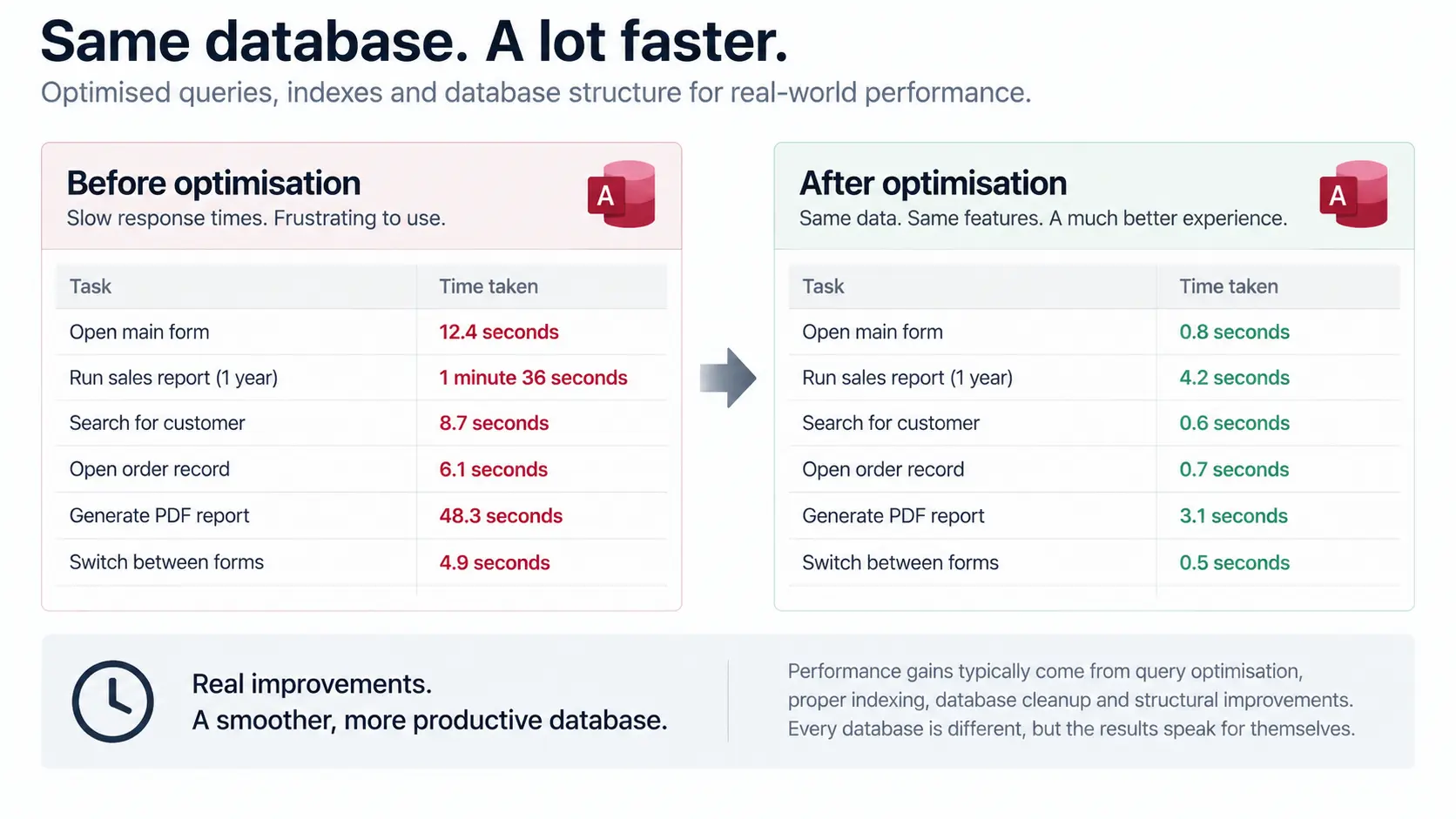
What if tuning isn’t enough?
Then we’ll say so before you pay for tuning that can’t work.
Three things put a database beyond it: too many people in at once for a file-based database, a data file close to 2GB, or staff who need it from outside the office. In those cases the fix is to move the data (Access migration and upgrades), and your interface stays as it is.
Crashes and corruption are a different problem, covered under Access repair and recovery. If you’re not sure which you’ve got, an Access health check costs £495 (+VAT) and tells you in writing.
What’s slow, and when?
Tell us which part people complain about, when it’s worst, and roughly how many people use it. From that we can normally say whether it’s a tuning job or something else, and what it would cost.