

In plenty of cases it’s the best tool for the job, so why not use it?
Rather than building a database and an interface, Excel is a quick way to gather, shape and analyse data. It’s already installed, everyone knows it, and it produces an answer this afternoon rather than next quarter.
More business data sits in spreadsheets than in any other kind of document. IT departments don’t love it, but it works — and most spreadsheets never come close to Excel’s limits.
This page is about the ones that do.
Where Excel genuinely wins
- Analysis and modelling — what-ifs, scenarios, forecasts. Nothing beats it.
- One-off or short-lived work — a piece of analysis with a start and an end
- Personal working — one person, one file, their own numbers
- The last mile of reporting — figures pulled from a proper system and shaped for a board pack
- Anything where the flexibility is the point and structure would get in the way
Finance teams live in Excel and there’s no sense fighting that. A well-built system should feed Excel, not try to replace it.
The signs you’ve outgrown it
The data is spread across more than one file. If it’s in several, it’s almost certainly time to consider a database. If it’s in hundreds, you need a database to manage the spreadsheets.
More than two or three people are entering data. Co-authoring helps, but it doesn’t stop two people making contradictory changes to the same record, and it doesn’t tell you which one was right.
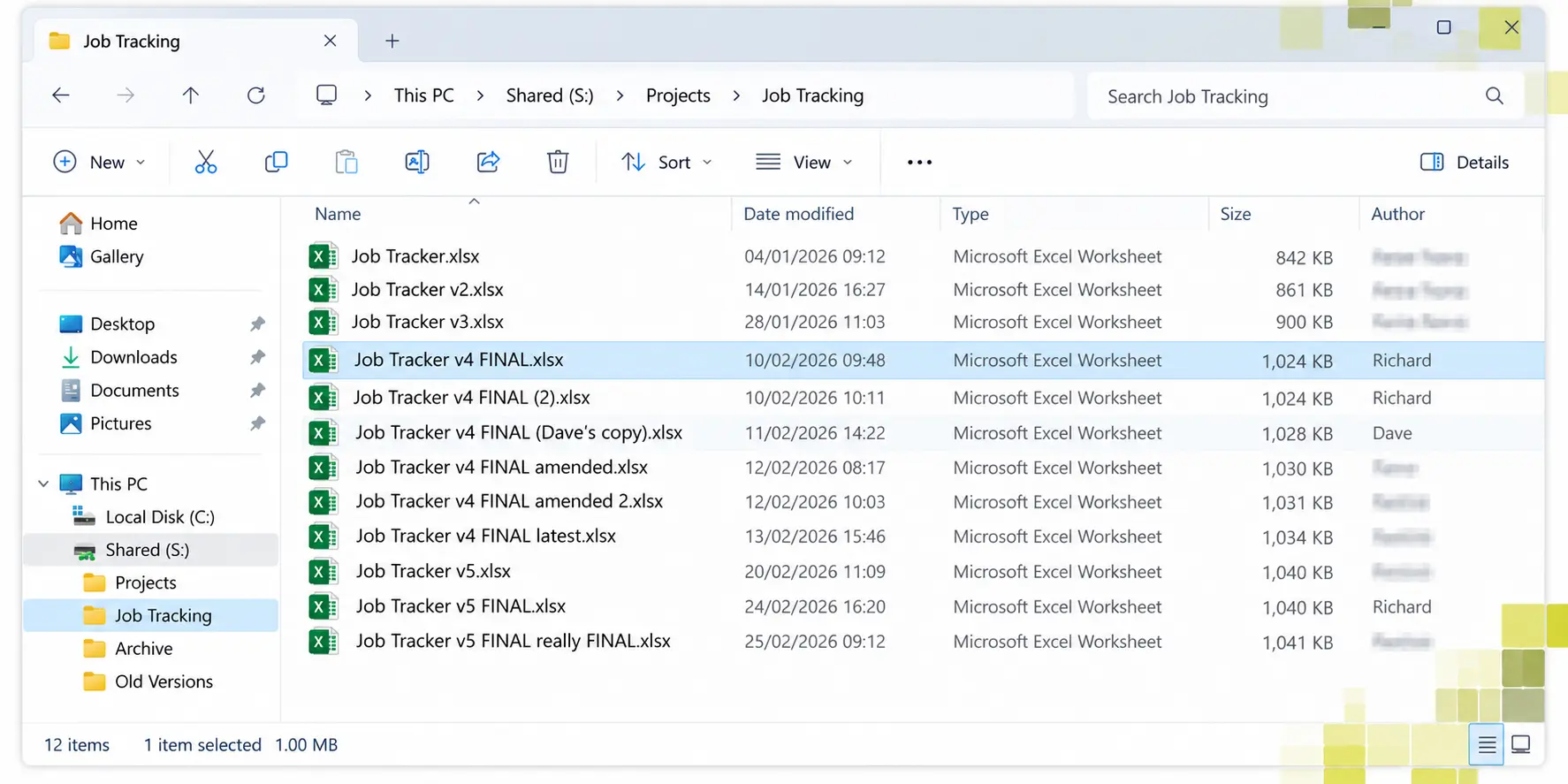
Nobody can say which copy is current. The version-suffix folder is the clearest symptom there is.
Finding and changing individual records takes real time. Adding rows is rarely the problem; it’s changing one of forty thousand that becomes the problem.
It’s grown sideways. Past about column AZ it stops being possible to hold in your head — which usually means several different things have been crammed into one sheet.
The same information is typed into more than one place, and the two no longer agree.
One person understands the macros, and everyone else is slightly afraid of the file.
When a spreadsheet quietly stops recording
16,000
positive Covid tests that were never followed up
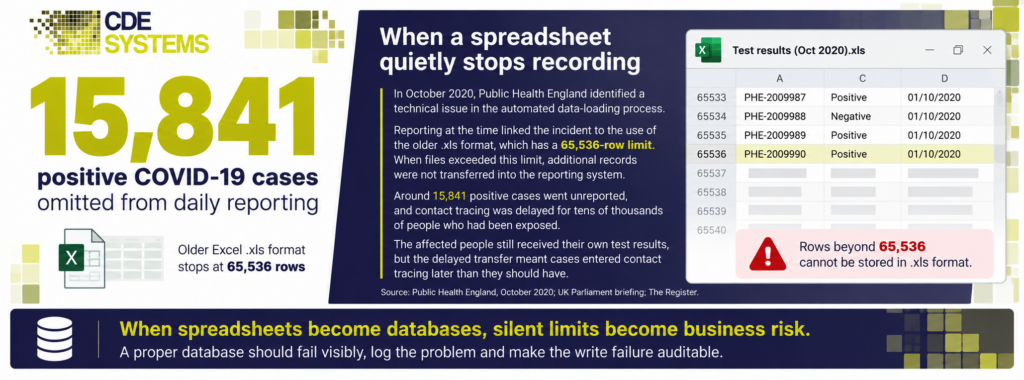
In October 2020, Public Health England was collating test results in Excel using the old
.xlsformat — which stops at 65,536 rows.The file reached its limit and simply stopped recording. No error. No warning. It looked like it was working.
Around 16,000 positive cases went unreported, and contact tracing never happened for tens of thousands of people who’d been exposed.
That’s the thing about spreadsheets used as databases. They don’t fail loudly. They carry on looking fine while quietly doing something other than what you think.
A database would have rejected the write, logged the error and told somebody. Excel just ran out of room.
The other things that go wrong quietly
Not “Excel is bad”. These are the specific failures we get called in after.
Errors nobody sees. A formula that stopped at row 400 when the data reached 900. A row inserted outside a SUM range. The spreadsheet doesn’t tell you it’s wrong — it produces a number, and somebody makes a decision with it.
No audit trail. Who changed that figure, when, and why? A database answers that. A spreadsheet can’t.
Nothing validates what goes in. Nobody’s stopping “N/A” in a date field, or the same customer entered four times under slightly different spellings.
Personal data on laptops. If the spreadsheet holds customer or staff information, every copy is a copy of that information. That’s a harder conversation than people expect when somebody finally asks.
It stops when the person does. Holiday, illness, resignation — and the process stops with them, because they were the only one who understood the macros.
It doesn’t have to be all or nothing
The choice isn’t “keep the spreadsheets” or “spend six months on a system”.
Put the data somewhere proper and keep Excel on the front. Records live in a real database — one version, validated, with an audit trail — and Excel connects to it live for the analysis it’s genuinely good at. Nobody gives up the tool they like.
Start with the one causing trouble. Not all of them. There’s usually a single spreadsheet doing something it shouldn’t, and fixing that one is a small job.
Access is often the right first step — single site, handful of users, a big jump in reliability without being a project → Why use Microsoft Access?
SQL Server when it’s bigger than that — more users, remote access, or data you’d be in real trouble for losing → SQL Server
Send us the spreadsheet
Genuinely. Send us the one that’s causing the most grief and we’ll tell you what we’d do with it — whether that’s a database, a tidy-up of the spreadsheet itself, or nothing at all.
Plenty of the systems we’ve built started as one spreadsheet that had quietly become the thing the business ran on.
Case Studies
 Commercial Catering Service & Maintenance (field service)
Aire Valley Catering
Field service apps that work with no signal
Aire Valley Catering’s engineers work in commercial kitchens across the UK, often with no usable signal, and every job still has to be recorded. We built four production…
View case study
Commercial Catering Service & Maintenance (field service)
Aire Valley Catering
Field service apps that work with no signal
Aire Valley Catering’s engineers work in commercial kitchens across the UK, often with no usable signal, and every job still has to be recorded. We built four production…
View case study
 Transport and logistics
ACC Worldwide
A faster SQL Server system, noticed on day one
ACC Worldwide’s staff used one business system all day, every day, and it was slow. We worked on the SQL Server environment behind it. The speed-up was immediate,…
View case study
Transport and logistics
ACC Worldwide
A faster SQL Server system, noticed on day one
ACC Worldwide’s staff used one business system all day, every day, and it was slow. We worked on the SQL Server environment behind it. The speed-up was immediate,…
View case study
 Travel and leisure (adventure travel and expeditions)
Jagged Globe
Keeping bookings, customer records and the website in step
Jagged Globe runs on an internal database and a booking website that have to agree every day, and sometimes they didn’t. We traced and fixed the transfers between…
View case study
Travel and leisure (adventure travel and expeditions)
Jagged Globe
Keeping bookings, customer records and the website in step
Jagged Globe runs on an internal database and a booking website that have to agree every day, and sometimes they didn’t. We traced and fixed the transfers between…
View case study
Which spreadsheet is causing the most trouble?
Send it over — or just describe it. We’ll tell you whether it’s outgrown Excel, what the alternatives would cost, and whether it’s worth doing anything at all.