

“Should we move SQL Server to the cloud?” sounds like one question. In practice it’s three, because there are three ways to run SQL Server in Azure, and each one comes with a different amount of change and a different monthly bill.
CDE Systems has worked with SQL Server since 1999, and we’ll tell you which Azure option fits, what it costs to run each month as well as to build, and what changes for the people using it. Or whether you’d actually be better off staying as you are.
If you go ahead, we move it, look after it, and hand you the definition of the whole environment so it’s never tied to us.
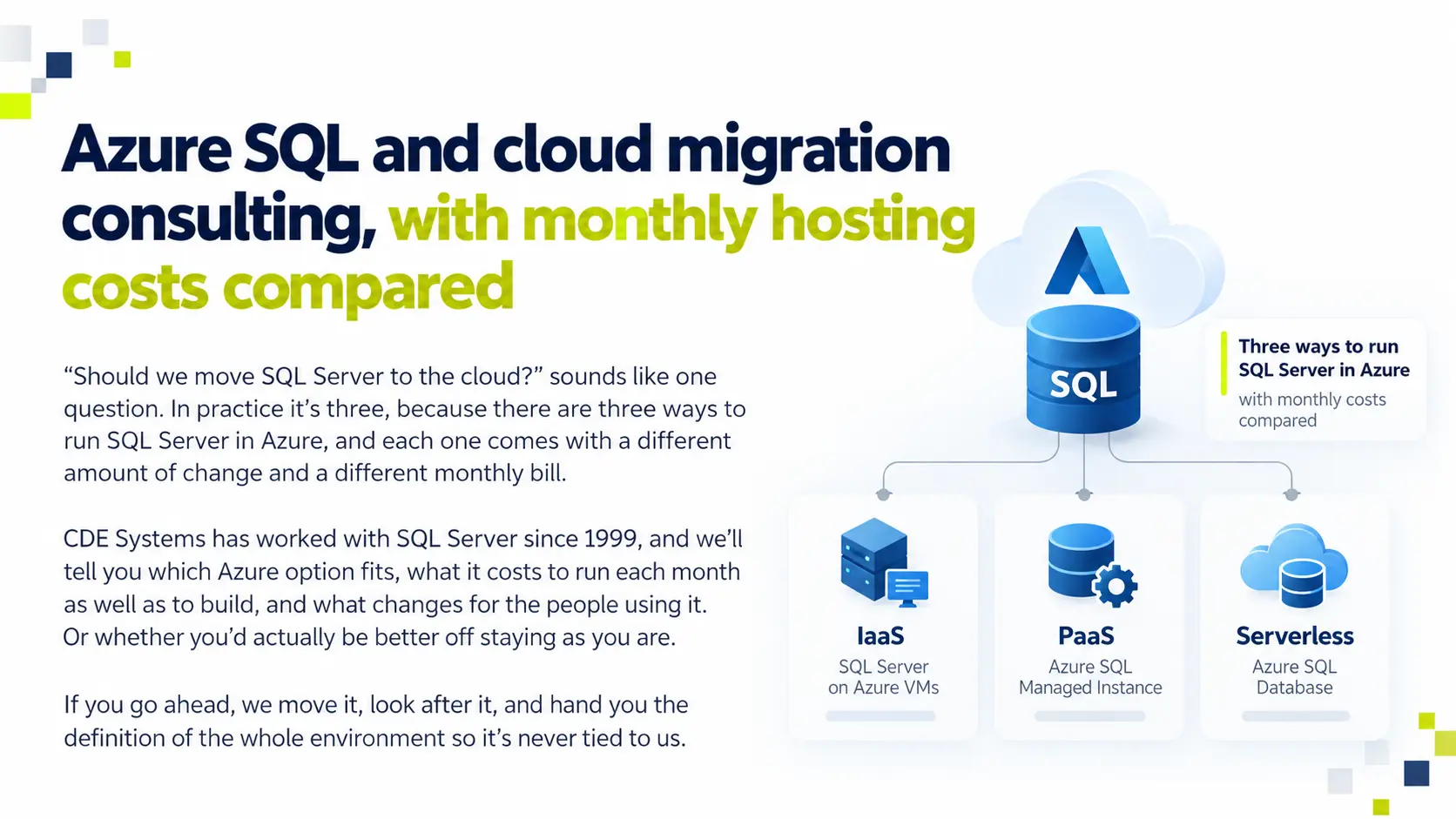
Three ways to run SQL Server in Azure
Azure SQL Database, Managed Instance and SQL Server on a VM compared
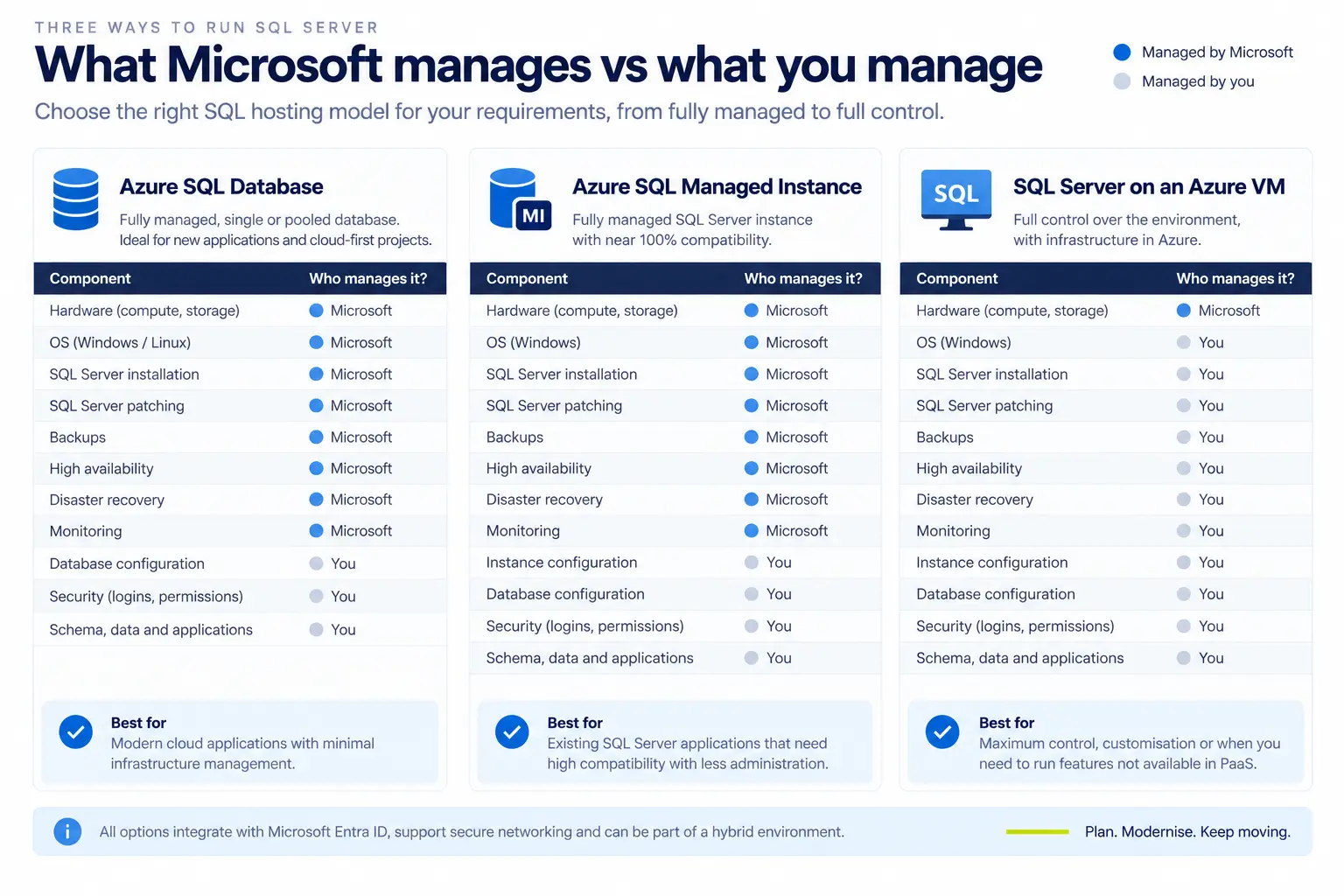
| Azure SQL Database | Azure SQL Managed Instance | SQL Server on an Azure VM | |
| What it is | A single database as a service | Nearly all of SQL Server, managed for you | A server you run, in Azure |
| Patching and backups | Microsoft | Microsoft | You, or us |
| SQL Agent jobs | No | Yes | Yes |
| Cross-database queries | No | Yes | Yes |
| Linked servers | No | Yes | Yes |
| Changes to your application | Likely | Few | None |
| Usually suits | New builds and single applications | Moving a whole estate as it is | Old versions and unusual dependencies |
If you’re moving a system that already exists, the choice is nearly always between Managed Instance and a VM, depending on how much of the running of it you want Microsoft to take on. Azure SQL Database comes into its own for something new.
What will it cost each month?
You pay for the build once. You pay for running it every month for as long as it runs, and that second figure is the one that catches people out.
- Licences you already have. If your SQL Server and Windows Server licences have Software Assurance, Azure Hybrid Benefit counts them against the Azure bill. It gets missed surprisingly often.
- Committing for longer. Reserved capacity takes a substantial amount off the bill if you sign up for one or three years.
- Sizing from measurements. Other providers tend to quote for a big server because it’s easier than measuring what you use. We measure, because it’s the only way to get the size right.
- The line items people forget. Egress, storage tiers and backup retention.
- Identity licensing. Conditional access needs Entra ID P1. Privileged Identity Management and access reviews need P2. Better to know before it’s assumed.
- Switching things off. Development and test environments can be paused while they’re not in use.
You get a monthly figure before you commit.
Still on SQL Server 2016 or older? It’s out of support, and workloads moved to Azure get Extended Security Updates at no extra cost. Once the cost of on-premises ESUs is counted, that can make Azure the cheaper option. It’s worth pricing both before deciding. See SQL Server migration and upgrades.
Will the move disrupt the business?
It shouldn’t if it’s done properly, and most of our work goes into making sure it doesn’t.
- We map everything first. We list what’s on the server, what depends on it and what talks to it, in both directions. That means agent jobs, linked servers, SSIS packages and reports, plus the applications people had forgotten were pointed at it. It’s the step most often skipped, and it’s the one that stops data going missing and downtime nobody planned for.
- We rehearse on a copy, and time it, so the outage window we quote is one we’ve measured.
- The cutover date is agreed in advance, with a written rollback plan and the old system kept intact until you’re satisfied.
- Counts and totals are reconciled afterwards, and signed off by someone on your side.
Hybrid is fine, too. Plenty of businesses move some things to Azure, keep the rest on-premises, and leave it like that.
Will we be tied to whoever builds it?
Not if it’s built as code. We write Azure environments as Terraform, covering the database, the networking, private endpoints, Key Vault, App Service and the rules that tie them together. Development, test and production all come from one definition, a rebuild gives you the same thing every time, and any drift shows up as a difference you can see.
You own that definition. If the work moves in-house or to someone else, the environment goes with it. Where a team already works in Microsoft’s own tooling, Bicep or ARM templates do the same job.
Is it secure?
Once you’re in Azure, who can get at your data is mostly decided by Entra ID, not the firewall. It’s also where most estates are weakest. This section is written for whoever looks after your accounts.
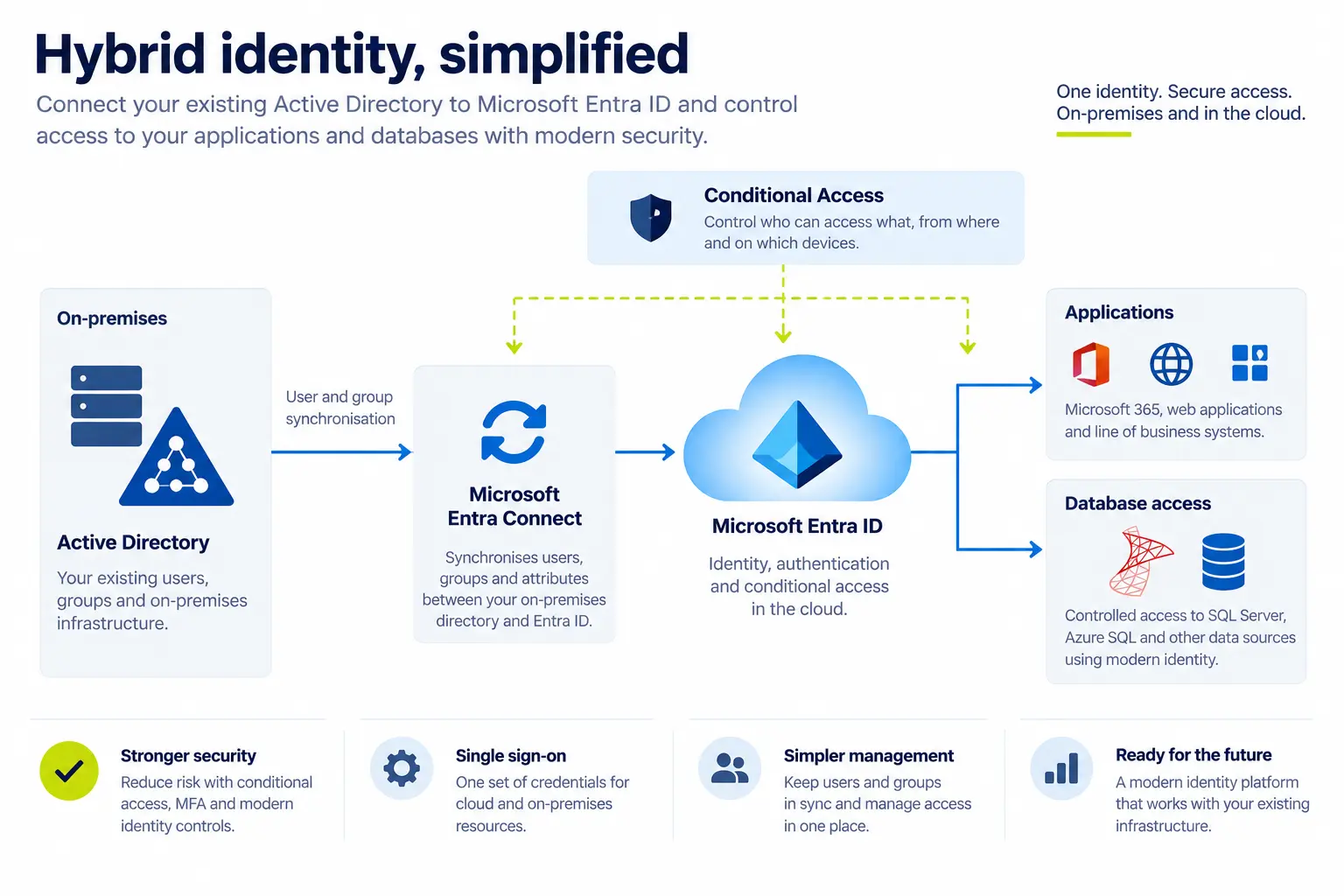
Hybrid identity, Entra ID and database access control
Hybrid identity. Most businesses keep their on-premises Active Directory when they move, and that’s fine. We set up and look after the link between the two with Entra Connect or Cloud Sync. That includes deciding what’s in scope and what’s filtered out, and choosing between password hash sync and pass-through authentication. We also monitor the sync, so a failure is noticed the day it happens. Sync problems are quiet. An object that stops replicating or a duplicate proxy address won’t announce itself, but it will turn into an access problem eventually.
Joiners, movers and leavers. This is the part that fails audits.
- Access by group, not by person, including database access. A SQL login made by hand for one person is invisible to every HR process you have
- Movers lose the access their old role needed. Without that, ten years of role changes add up to someone who can reach everything
- Leavers are disabled, their sessions and tokens revoked, licences reclaimed, groups removed, and mailbox and files dealt with. Without continuous access evaluation, a disabled account can keep working for up to an hour on a token it already holds
- Soft-deleted accounts can be recovered for 30 days. That’s a safety net, not a finished offboarding, so permanent removal should be a decision
- Orphaned access gets found and tied to something manageable. Typical finds are a service account with no owner, a shared password in a spreadsheet, and a SQL login belonging to someone who left in 2019
- Regular access reviews, so “who can get into this?” is answered by running a report
Passwords and lockouts. Smart lockout and Entra Password Protection, with the banned-password list extended to on-premises AD so the same rules apply on both sides. Self-service password reset, because most lockouts don’t need a person. Thresholds set sensibly, since a lockout policy that’s too strict pushes people into writing passwords down.
Privileged access. MFA and conditional access on admin accounts. Just-in-time admin rights through Privileged Identity Management, so standing admin access stops being permanent. Break-glass accounts that exist, are deliberately left out of conditional access, and are monitored.
On the database itself. Entra ID authentication in place of shared SQL logins whose passwords haven’t changed since installation. Managed identities for applications, so there’s no password in a connection string or secret in a config file to leak. Key Vault for the secrets that do have to exist. Audit and diagnostic logs kept somewhere they can be searched after an incident, before they roll over.
Public sector, NHS and regulated data
Our clients since 1999 have included local and central government and NHS organisations as well as businesses. A system that holds personal or patient data gets asked the same five things every time. Who can reach it, and how do you prove that? Where does it live? What’s logged? And what happens if it goes wrong? We build so that each one has an answer.
We can also help with the paperwork, including Data Security and Protection Toolkit (DSPT) submissions, Digital Technology Assessment Criteria (DTAC) responses, Cyber Essentials, and the security questionnaires that come with tenders and renewals.
What we run around the database
Where a system needs more than a database, such as a portal, an API, a web interface or background processing, we build and run that in Azure too, against the same data.
- App Service for web applications and APIs, connecting to the database with a managed identity
- Container Apps for work that needs to scale to zero between bursts, or scale out under load without running a cluster
- Container Instances for scheduled and one-off jobs, such as overnight imports, report generation and data exchange with other systems
- Azure Kubernetes Service where an estate really needs it. Most don’t, and we’ll say so
- Azure Cache for Redis in front of the database, for reads that don’t need to reach SQL every time
- Queues and background processing, so imports, exports, documents and notifications run separately and don’t leave someone waiting on a timeout
- Private endpoints and network isolation, so the database can’t be reached from the public internet at all
Looking after it afterwards
Once it’s live, we can manage a full or hybrid Azure deployment for you.
- Monitoring, alerting and cost reviews, including telling you when you’re paying for something you don’t use
- Backups and retention, with restores tested
- Failover and disaster recovery. Azure makes real disaster recovery affordable for businesses that could never justify a second site, but it still has to be set up on purpose and tested
- Patching, maintenance and keeping versions current
- Performance tuning, which matters more in Azure because the size of the server is a monthly cost. See SQL Server performance tuning
SQL Server support and consultancy covers all of this.
When Azure isn’t the answer
We’d sooner say so now than halfway through. If the server is well specified and has life left in it, the system is stable, nobody needs to reach it from outside, and there’s no compliance pressure, staying put is often cheaper and simpler. Azure is worth it for specific reasons, and if none of them apply to you, it isn’t.
If you’re not sure where you stand, start with an assessment. A SQL Server health check costs £495 (+VAT)
Case Studies
 Commercial Catering Service & Maintenance (field service)
Aire Valley Catering
Field service apps that work with no signal
Aire Valley Catering’s engineers work in commercial kitchens across the UK, often with no usable signal, and every job still has to be recorded. We built four production…
View case study
Commercial Catering Service & Maintenance (field service)
Aire Valley Catering
Field service apps that work with no signal
Aire Valley Catering’s engineers work in commercial kitchens across the UK, often with no usable signal, and every job still has to be recorded. We built four production…
View case study
 Transport and logistics
ACC Worldwide
A faster SQL Server system, noticed on day one
ACC Worldwide’s staff used one business system all day, every day, and it was slow. We worked on the SQL Server environment behind it. The speed-up was immediate,…
View case study
Transport and logistics
ACC Worldwide
A faster SQL Server system, noticed on day one
ACC Worldwide’s staff used one business system all day, every day, and it was slow. We worked on the SQL Server environment behind it. The speed-up was immediate,…
View case study
 Travel and leisure (adventure travel and expeditions)
Jagged Globe
Keeping bookings, customer records and the website in step
Jagged Globe runs on an internal database and a booking website that have to agree every day, and sometimes they didn’t. We traced and fixed the transfers between…
View case study
Travel and leisure (adventure travel and expeditions)
Jagged Globe
Keeping bookings, customer records and the website in step
Jagged Globe runs on an internal database and a booking website that have to agree every day, and sometimes they didn’t. We traced and fixed the transfers between…
View case study
Get a monthly figure before you commit
Tell us what’s on the server, roughly how many people use it, and how much downtime you could live with during a move. We’ll come back with which Azure option fits, what it would cost a month, and whether it’s worth doing at all.