
The system has been running the business for years, sometimes decades. It holds data nobody could recreate and rules about how the work gets done that were never written down anywhere else. It’s also getting harder to live with. Staff can’t reach it away from the office, it doesn’t connect to anything newer, and someone has started talking about a replacement.
There’s usually a better route. Most of what people want from a new system can be added to the one they have, a piece at a time, while the business carries on using it.
CDE Systems works out what’s worth keeping before anything changes. Then we add what’s missing, in stages you can stop after, and the plan is yours whether we do the work or not.
Where are you with it?
| If this is where you are | Start here |
|---|---|
| Whoever built it has gone, and nobody fully understands it | Legacy software rescue |
| Staff need it from home, on site or at a customer’s office | Web applications for existing systems |
| People out on the job are still filling in paper | Mobile apps for existing systems |
| Customers ring to ask things the system already knows | Customer portals and self-service |
| It’s an Access system that has reached its limits | Access database modernisation |
| The database is fine but the application on top of it isn’t | SQL Server modernisation |
| You can’t get useful numbers out of it | Reporting and business intelligence |
| The same figures get typed into two systems | Database integration and APIs |
| You’re being pushed towards the cloud | Azure and cloud |
Modernise or replace?
A replacement quote is the easiest thing for a supplier to sell. It’s also the hardest to deliver, because the expensive part of a business system was never the software. It’s the twenty years of decisions built into it, and a replacement project has to find every one of them again.
So before recommending any big change, we look at five things. We look at what already works well and should be left alone, and which processes the business can’t run without. We look for where speed, usability or reporting could improve. Then we check what could be connected to what, and whether the system can be extended at all.
For most of the systems we see, keeping the core and adding to it is quicker, cheaper and safer than starting again. People keep the system they know and get the parts they were missing. Staff don’t have to relearn everything at once.
What can be added
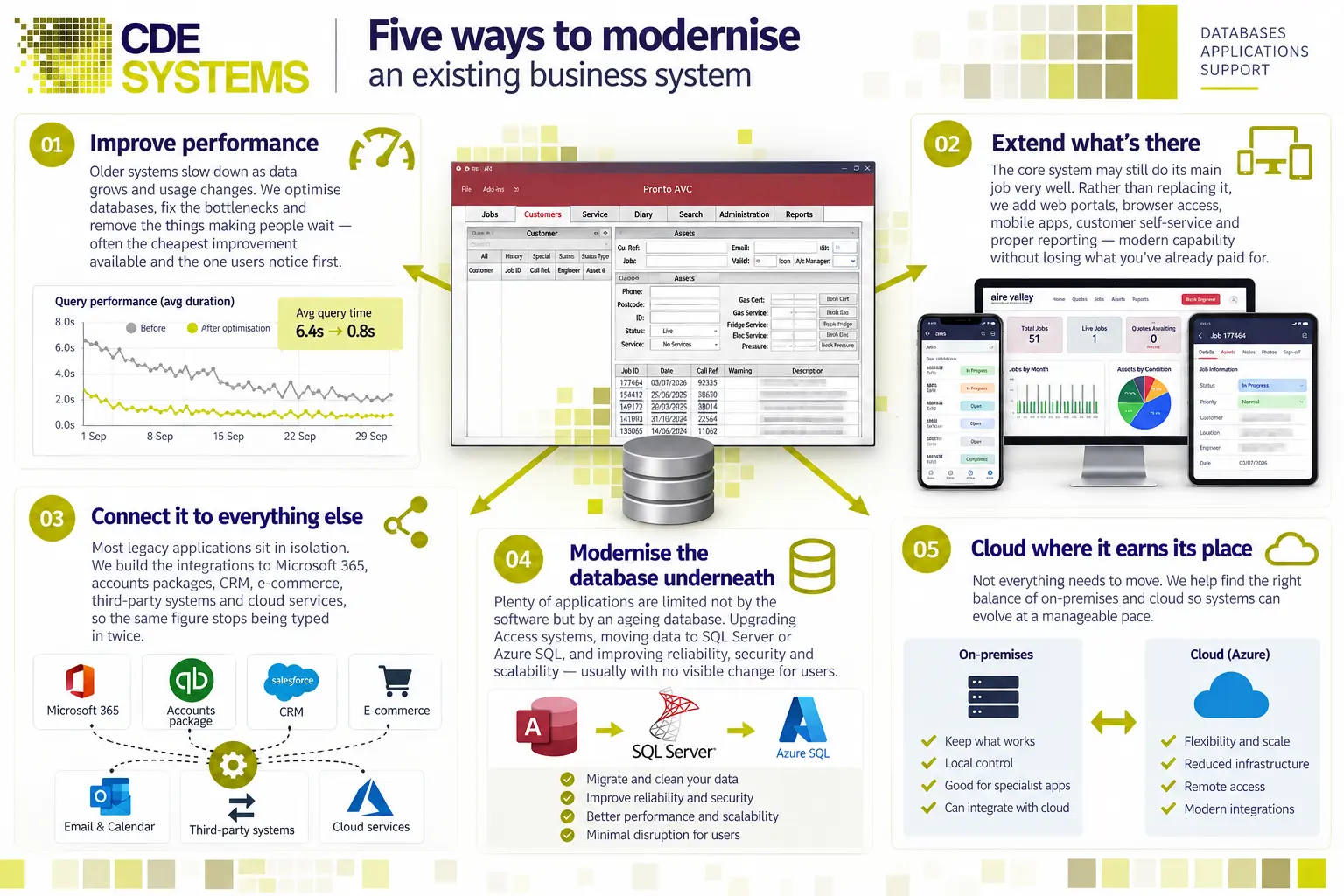
Speed. Older systems slow down as the data grows. Fixing the bottlenecks is often the cheapest improvement available, and the one staff notice first.
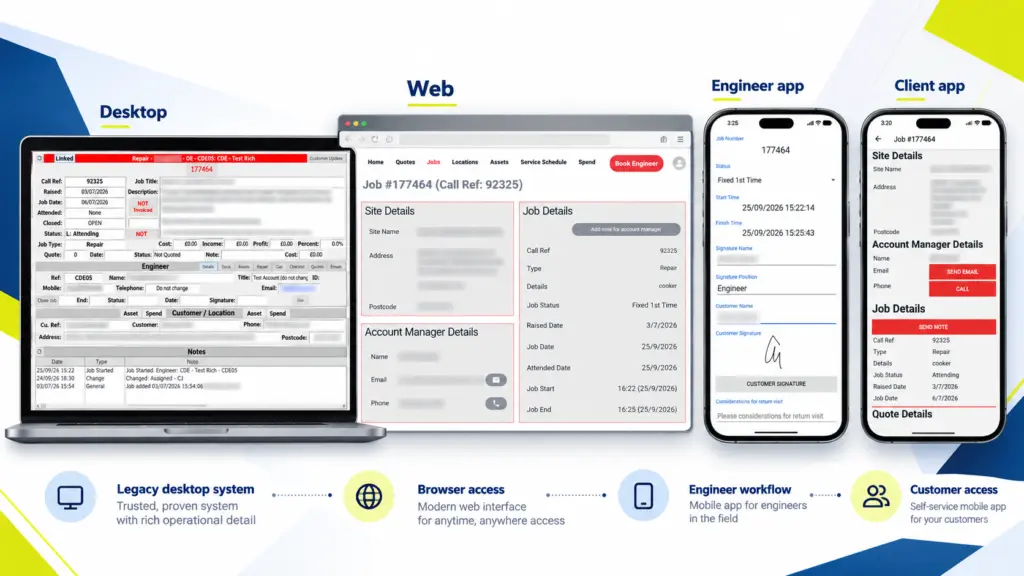
Access from anywhere. A browser interface for people away from a desk, an app for people on site, or a portal for customers and suppliers. All of them work against the same data as the office.
Connections. Links to Microsoft 365, the accounts package, a CRM or a web shop, so the same figure stops being typed in twice.
A newer database underneath. Moving an Access back end to SQL Server or Azure SQL, or upgrading an old SQL Server, improves reliability and security. Users usually see no change at all.
Cloud, where it earns its place. Not everything needs to move. Part of the job is finding the right mix of your own servers and the cloud, at a pace the business can manage.
How a modernisation project runs
We start with what the business is trying to achieve, which is rarely the same as the feature list someone has written down. Then we work out where a targeted change would do the most good, and in what order.
What you get first is a plan in stages, weighed against the budget and the technical reality. It’s yours whether or not you use us for the work.
After that, each stage is built, put in front of the people who’ll use it and settled before the next one starts. Something useful usually lands within weeks. The old system keeps running throughout, and if you stop after the first stage, what’s been built still works.
When replacing it is the right call
Sometimes it is, and we’ll say so. That might be because the platform is out of support and can’t be secured, or because the data model can’t carry what the business now does. Or keeping it running may honestly cost more than replacing it.
If so, replace it carefully, in stages, with the old system running until the new one has earned its place. We’d rather say that at the start than take money to prop something up for another two years.
Case Studies
 Commercial Catering Service & Maintenance (field service)
Aire Valley Catering
Field service apps that work with no signal
Aire Valley Catering’s engineers work in commercial kitchens across the UK, often with no usable signal, and every job still has to be recorded. We built four production…
View case study
Commercial Catering Service & Maintenance (field service)
Aire Valley Catering
Field service apps that work with no signal
Aire Valley Catering’s engineers work in commercial kitchens across the UK, often with no usable signal, and every job still has to be recorded. We built four production…
View case study
 Transport and logistics
ACC Worldwide
A faster SQL Server system, noticed on day one
ACC Worldwide’s staff used one business system all day, every day, and it was slow. We worked on the SQL Server environment behind it. The speed-up was immediate,…
View case study
Transport and logistics
ACC Worldwide
A faster SQL Server system, noticed on day one
ACC Worldwide’s staff used one business system all day, every day, and it was slow. We worked on the SQL Server environment behind it. The speed-up was immediate,…
View case study
 Travel and leisure (adventure travel and expeditions)
Jagged Globe
Keeping bookings, customer records and the website in step
Jagged Globe runs on an internal database and a booking website that have to agree every day, and sometimes they didn’t. We traced and fixed the transfers between…
View case study
Travel and leisure (adventure travel and expeditions)
Jagged Globe
Keeping bookings, customer records and the website in step
Jagged Globe runs on an internal database and a booking website that have to agree every day, and sometimes they didn’t. We traced and fixed the transfers between…
View case study
What can’t your system do?
Tell us what the business needs that the software can’t manage, and what working around it is costing you. We’ll come back with whether it can be added to what you’ve got, what it would take, and what it would cost.